Rapid PHP 202217.0
Publisher Description
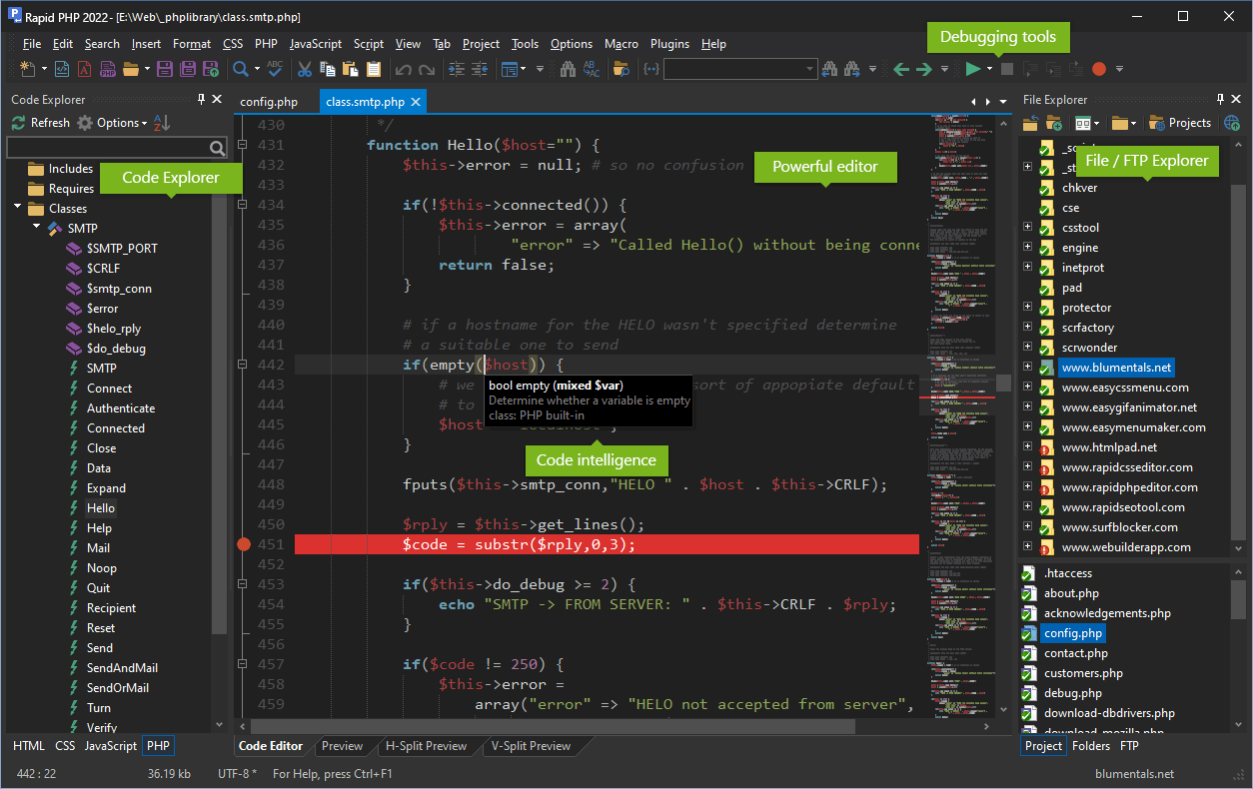
Quick, lightweight and very powerful PHP editor that combines features of a fully-packed PHP IDE with unmatched performance. Rapid PHP editor is the most complete all-in-one software for coding PHP, HTML, CSS, JavaScript and other web development languages with tools for debugging, validating, reusing, navigating and formatting your code. Whether you are a professional developer or pure enthusiast, with Rapid PHP editor you can get your job done faster, save your time and increase productivity.
Features include:
* full HTML5 and CSS3 compatibility;
* syntax highlighting for all popular web development languages;
* advanced PHP debugger;
* code intelligence for PHP, HTML, CSS, JavaScript and Smarty;
* PHP formatter;
* bracket highlighting;
* code folding;
* built-in File and (S)FTP Explorer;
* Go to anything;
* project management;
* built-in Web browser;
* integration with Web server;
* code explorer;
* built-in multi-browser preview;
* jQuery, React, Vue.js JavaScript framework support
* Laravel, CodeIgniter, Symfony, Yii, Nette, Prado, CakePHP PHP framework support
* SQL explorer;
* find and replace with regular expression support;
* find and replace in files;
* multi-item clipboard;
* UTF-8 Unicode support;
* spelling checker;
* code snippet library;
* HTML and CSS code assistants;
* HTML and CSS validation tools;
* support for popular PHP and JavaScript frameworks and countless other goodies.
About Rapid PHP 2022
This ASP & PHP program is available in English, Dutch, French, German, Hungarian, Russian, Spanish. It was last updated on 29 September, 2026. Rapid PHP 2022 is compatible with the following operating systems: Windows.
The company that develops Rapid PHP 2022 is Blumentals Software. The latest version released by its developer is 17.0. This version was rated by 1 users of our site and has an average rating of 3.0.
The download we have available for Rapid PHP 2022 has a file size of 104.9 MB. Just click the green Download button above to start the downloading process. The program is listed on our website since 2022-01-14 and was downloaded 159 times. We have already checked if the download link is safe, however for your own protection we recommend that you scan the downloaded software with your antivirus. Your antivirus may detect the Rapid PHP 2022 as malware if the download link is broken.
How to install Rapid PHP 2022 on your Windows device:
- Click on the Download button on our website. This will start the download from the website of the developer.
- Once the Rapid PHP 2022 is downloaded click on it to start the setup process (assuming you are on a desktop computer).
- When the installation is finished you should be able to see and run the program.
Program Details
General
System requirements
Download information
Pricing
Version History
version 17.0
posted on 2022-01-14
Code minimap
Full fledged side-by-side FTP client
CSS inline color preview
Updated Chrome preview version
Updated HTML, JavaScript, CSS, PHP language support and features
Faster application launch and exit when multiple tabs are kept open
Many new and rewritten features
version 16.2
posted on 2020-08-12
React and Vue.js framework support
Updated HTML, JavaScript, CSS, PHP language support and features
Various fixes
version 16.0
posted on 2019-11-21
Radically improved search and replace - slim, dockable search windows, improved UI
Split editing of the same file
Updated Chrome preview version
Updated HTML, JavaScript, CSS, PHP language support and features
Various fixes
version 15.5
posted on 2019-07-04
Various usability improvements
Various performance improvements
Updated SFTP support
Improved JavaScript syntax checker
Improved plugins engine
Various fixes
version 15.0
posted on 2018-04-06
Upgraded user interface with high resolution monitor / high-DPI support
Complete dark visual theme
Updated HTML, JavaScript, CSS, PHP language support and tools
Improved FTP/SFTP/FTPS features
New code beautifiers for HTML, CSS and PHP
Over 100 other new features and fixes
version 14.3
posted on 2017-04-20
* Improved color picker
* Improved high DPI support
* Plugin improvements
* Improved file explorer
* Various smaller fixes and improvements
version 14.0
posted on 2016-04-02
* New GUI and window docking system
* Goto anything for instant navigation
* Improved text editor
* Improved HTML, CSS, JavaScript and PHP support
* Improved FTP/SFTP support
* Improved preview
* Over 100 smaller fixes and new features
